
Assistive Touch For Android
Screenshots
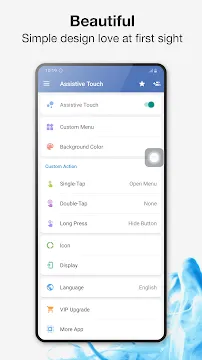
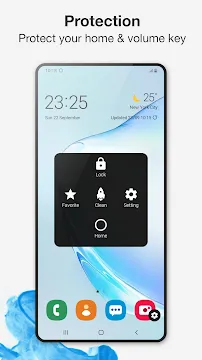
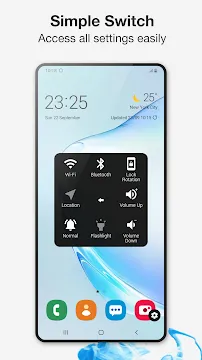
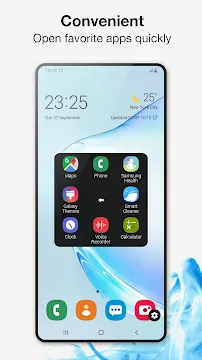
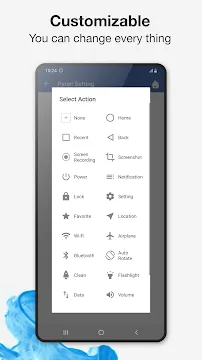
Assistive Touch For Android gives you a quick access menu on your mobile screen. This floating panel stays on top of your current screen. Therefore, you can control your device with just one single tap.
Many users love this tool because it mimics the popular iOS accessibility shortcut. However, this tool offers even more customization options for your smartphone. You can access your favorite settings instantly. For instance, you can change the volume or lock your screen quickly.
Furthermore, the tool helps you navigate your device without using physical buttons. This feature protects your hardware from daily wear and tear. You will find that Assistive Touch For Android improves your daily mobile experience significantly. It makes handling large smartphones much more comfortable for everyone.
You can activate features without stretching your fingers across the display. This utility remains lightweight and highly responsive. Consequently, it does not slow down your device operating system. You will enjoy smooth animations every time you tap the floating icon.
Why You Need Assistive Touch For Android
Smartphones keep getting bigger every single year. Therefore, reaching the top of your screen with one hand becomes very difficult. Assistive Touch For Android solves this specific problem effectively. The small floating icon sits comfortably under your thumb. Consequently, you can operate your phone using only one hand.
In addition, physical buttons can break over time. If your power button stops working, you face a major issue. Assistive Touch For Android provides an excellent alternative solution. You can lock your screen via the virtual menu. This option extends the lifespan of your physical device buttons.
Many people also want to save time during their daily tasks. You often waste seconds searching for hidden settings menus. This tool keeps your essential shortcuts in one clear place. As a result, you complete your tasks much faster than before. You do not need to navigate complex system paths anymore. The shortcut panel remains available across all your open screens. Furthermore, you can position the button anywhere on the screen edges. This flexibility means it never blocks important text while you browse. Because of this benefit, your overall reading comfort increases greatly.
Core Features of the Floating Menu
The floating panel contains many useful tools. First, you get a virtual home button. A single tap takes you straight back to your main screen. This action mimics the classic hardware home button experience.
Second, you get a quick setting toggle menu. You can turn your Wi-Fi on or off within seconds. In addition, you can control your Bluetooth and location settings from this panel. You do not need to pull down the notification bar anymore.
Third, the menu includes a quick screenshot tool. Capturing your screen usually requires pressing two physical buttons at once. However, this panel lets you take screenshots with a single tap. This feature makes saving important information incredibly easy.
Here is a list of the common features you can control:
- Virtual volume keys to change sound levels.
- Flashlight toggle for instant bright light.
- Screen rotation lock for comfortable viewing.
- Clear RAM tool to speed up your device.
- Direct link to the main settings menu.
These features help you manage your device efficiently without hassle. Every feature functions perfectly with a light touch. Therefore, you save both time and physical effort during daily phone operations.
How to Customize Assistive Touch For Android
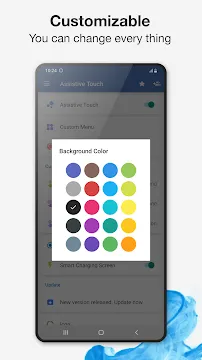
You can modify the appearance of the shortcut panel easily. Assistive Touch For Android allows you to change the background color of the menu. Therefore, you can match the panel with your current phone theme. You can choose from many beautiful modern colors.
Furthermore, you can change the floating icon itself. The default icon looks like a simple translucent circle. However, Assistive Touch For Android offers many fun alternative icons. You can select cute emojis, cartoon characters, or minimalist shapes. This feature makes your user interface look unique.
In addition, you can customize the layout of the shortcuts. You decide which icons appear inside the main floating panel. For example, you can remove the Bluetooth toggle if you rarely use it. Then, you can add a direct shortcut to your favorite messaging app instead. This level of customization ensures maximum daily productivity. You can adjust the transparency levels as well. This prevents the button from blocking your view while reading. Consequently, the menu remains unobtrusive yet easily accessible.
Protecting Your Physical Buttons Easily
Mechanical buttons have a limited lifespan because they wear out over time. Constant clicking eventually reduces their responsiveness. Consequently, your volume keys might stop clicking properly after a few years. Assistive Touch For Android prevents this physical damage from happening.
You can perform every hardware function through the soft panel. For instance, you can adjust the volume up or down on your screen. Therefore, you rarely need to press the physical side buttons. Your hardware remains in pristine condition for a much longer time.
This protection also maintains the resale value of your smartphone. Scratched or broken buttons reduce the value of your phone significantly. By using the floating menu, you keep your phone working like new. Thus, this simple utility tool saves you money on future hardware repairs. You will protect your investment without spending extra money. In addition, people with joint pain find this soft touch feature incredibly helpful. It removes the need for forceful physical pressing.
Boosting Your Smartphone Navigation Speed
Modern phone navigation sometimes requires too many swipes and gestures. You must swipe down for notifications and swipe up for apps. Assistive Touch For Android streamlines this entire process into one tap. As a result, you navigate your phone with much less effort.
The tool also includes a powerful RAM booster feature. Over time, background processes slow down your operating speed. You can tap the boost icon inside the floating menu to clear memory. Consequently, your phone runs smoother immediately without requiring a full device reboot.
Furthermore, switching between recent apps becomes faster. The panel includes a shortcut for your recent apps history. Therefore, you can jump between your tools without using complex gesture commands. This speed improvement makes multi-tasking highly efficient for busy users. You spend less time navigating and more time producing results. Consequently, your daily digital workflow becomes much more enjoyable.
How to Download Assistive Touch For Android
Getting this utility tool onto your smartphone is a very simple process. First, you need to open your official app store. Type Assistive Touch For Android into the search bar at the top. Select the correct tool from the verified search results.
Next, tap the install button to download the file. The file size remains small, so the download finishes quickly. After installation, open Assistive Touch For Android from your home screen menu. The tool will request a few necessary system permissions.
Specifically, you must allow the tool to display over other apps. This permission allows the floating icon to stay visible while you use other software. Once you grant this permission, the floating circle appears on your screen instantly. Now you can start customizing your settings immediately. The setup takes less than two minutes from start to finish. Therefore, anyone can complete the installation process without technical trouble.
Conclusion
Assistive Touch For Android provides an incredible way to improve your smartphone experience. It combines convenience, customization, and hardware protection into one simple package. You can control your whole device with minimal hand movement. Therefore, your daily phone usage becomes much more comfortable.
The tool helps everyone from busy professionals to people with physical limitations. It replaces broken buttons and speeds up your menu navigation effortlessly. Give Assistive Touch For Android a try today to experience faster phone management. You will enjoy a much smoother mobile experience every day.
- NetCut
- POCO Launcher
-
Samsung Wallpaper services
 Download
Samsung Wallpaper services
Samsung Wallpaper services provides automated background updates...
- Digital Wellbeing
- Android AICore
- Xiaomi Scanner
- Komi Store
- AdGuard VPN